
Product Features:
·Sampling, power supply, and computation are fully isolated
·Thermal printing technology
·LED digital display: high brightness, clearer display
·Simplified buttons: using mechanical buttons and a fully Chinese operating interface, making it more convenient to use
·Special recording paper: a unique consumable paper with handwriting that can last up to 10 years without disappearing
·EMC4 level standard
·Transparent protective cover: unobstructed observation of data, ensuring cleanliness of printing paper
·Gold plated print head: using imported nuts and thermal printing technology
Non standard support:
·Support program customization
·Customizable reminder methods for abnormal alarms, power outages, etc
·Support customized operation and maintenance configuration
Installation method:
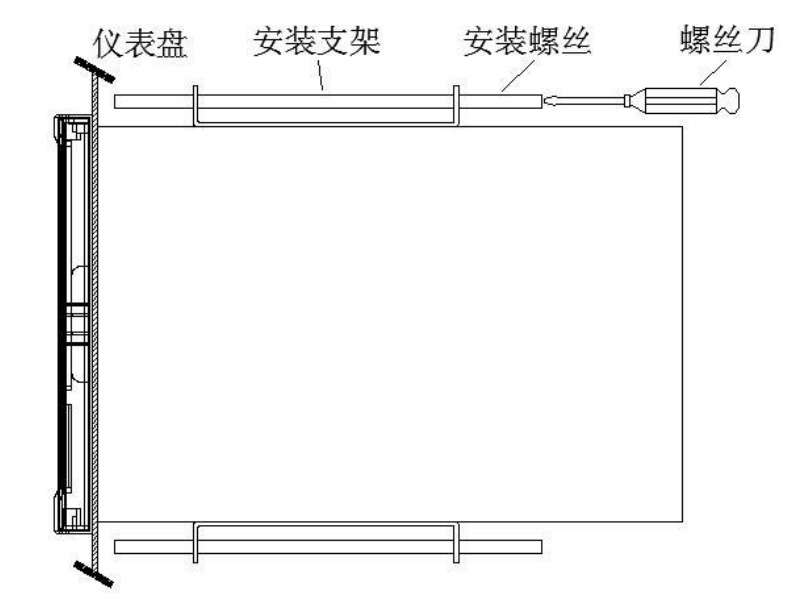
Installation method:
·Step 1: Gently push the instrument into the installation hole from the front of the installation panel (please use a steel plate), so that it is tightly attached to the instrument panel. The thickness of the installation panel is (2.0~8.0) mm.
·Step 2: Use the mounting bracket provided with the instrument panel as shown in the above figure and tighten the long screws on the two mounting brackets with a suitable screwdriver for installation (one bracket is installed on each side of the instrument panel, and the screws used for the instrument panel mounting bracket are M4 standard screws).
·Step 3: After installing the instrument panel, you can connect the signal and power lines.